Modern Home Office Furniture Essentials: Desk, Chair, Storage

By Tereza Hower | Published May 8, 2026 | Updated October 12, 2026
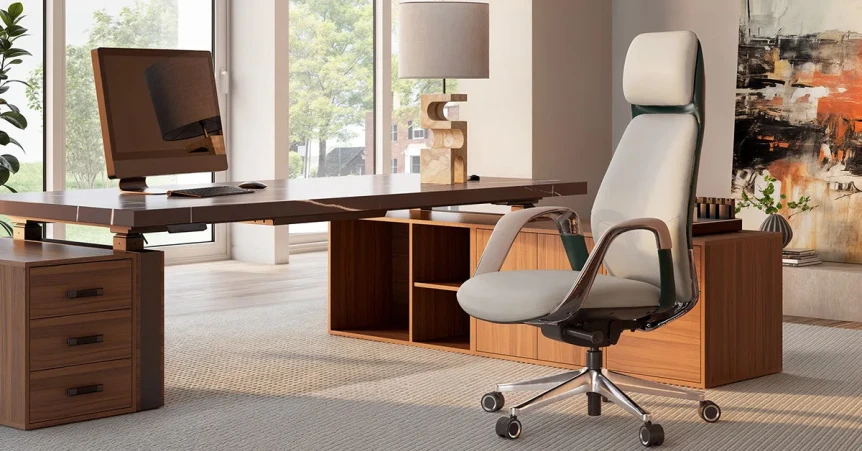
Modern home office furniture starts with three pieces that do the actual work: the desk, the chair, and the storage. Everything else is supporting cast. If those three pieces are right, the room works whether you have art on the walls yet or not. If those three pieces are wrong, no amount of styling will save the room from feeling off by month two.
This guide is the practical breakdown of those three pieces, independent of style direction. The same logic applies whether you are building a Japandi office, a mid century modern office, or any other direction. Style is the final layer. Function is what holds up over time.
Key Takeaways
- Spend more on the chair than the desk; the chair sets the price floor of the entire room.
- Choose solid wood for the desk top whenever the budget allows, and skip laminate entirely.
- One low credenza solves more storage problems than a tall bookcase and gives you a styling surface as a bonus.
- Cable management is the boring decision that separates a designed office from a workstation.
- Buy in order: chair, desk, credenza, lighting, rug, then everything else.
What Counts as Modern Home Office Furniture?
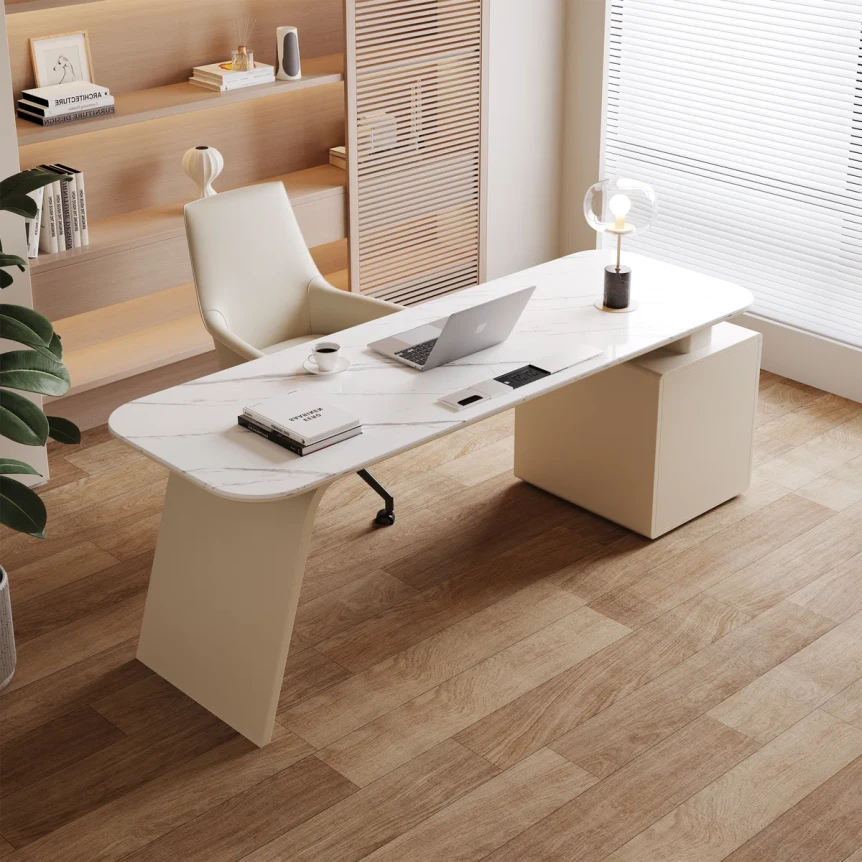
Modern home office furniture is the set of pieces designed for daily focused work in a home setting: a desk, an ergonomic task chair, a storage piece like a credenza, and the connective elements that make the room function (cable management, task lighting, a rug). The word modern here describes how the pieces are conceived, as long term residential furniture rather than corporate office equipment, not a single style.
Three principles separate furniture that earns its keep from furniture that does not. It has to support the way you actually work, not the way a catalog photograph suggests you should. It has to read as part of your home, not as office equipment that wandered in. And it has to last long enough to justify the spend, which usually means real materials and real ergonomics over surface decoration. For specific pieces worth buying, see Japandi office furniture.
How to Choose the Right Desk
The desk is the largest visual mass in the room. Three decisions matter more than the rest: depth, material, and base.
Depth: 28 to 30 inches is the sweet spot
Twenty four inch deep desks feel tight the moment you put a laptop, a monitor, and a coffee cup on the surface. Twenty eight to thirty inches gives you room to work without spreading sideways. If you use two monitors or write longhand regularly, push to thirty two. Beyond that and the desk starts to dominate small rooms.
Material: Solid wood ages better than anything else
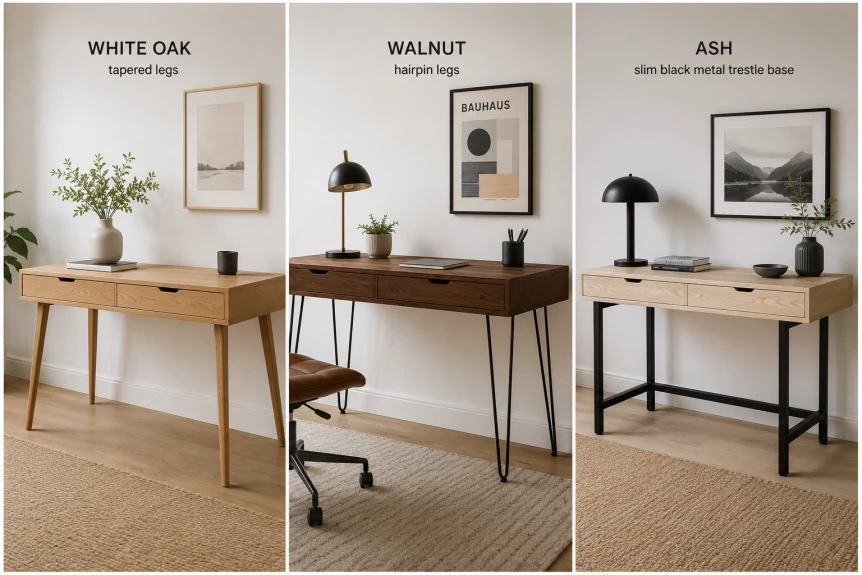
Solid wood is the right answer for almost every home office. It ages well, forgives small scratches in a way that veneer does not, and looks correct in almost every style direction. White oak reads light and Scandinavian. Walnut reads warmer and more mid century. Ash sits between them.
Veneer is the second tier choice. A high quality wood veneer over MDF can look almost indistinguishable from solid wood for the first few years. The problem is edges. Veneer chips at corners, peels at exposed edges, and cannot be sanded or refinished. After three years of daily use, the difference between solid wood and veneer is immediately visible.
Avoid laminate desks entirely. The surface is plastic, the edges are banded with glue, and the failure mode is bubbling and peeling. For a budget conscious build, a real butcher block top from a hardware store paired with a steel base is almost always a better choice than a furniture brand laminate desk at the same price.
Base: Thin profile keeps the room open
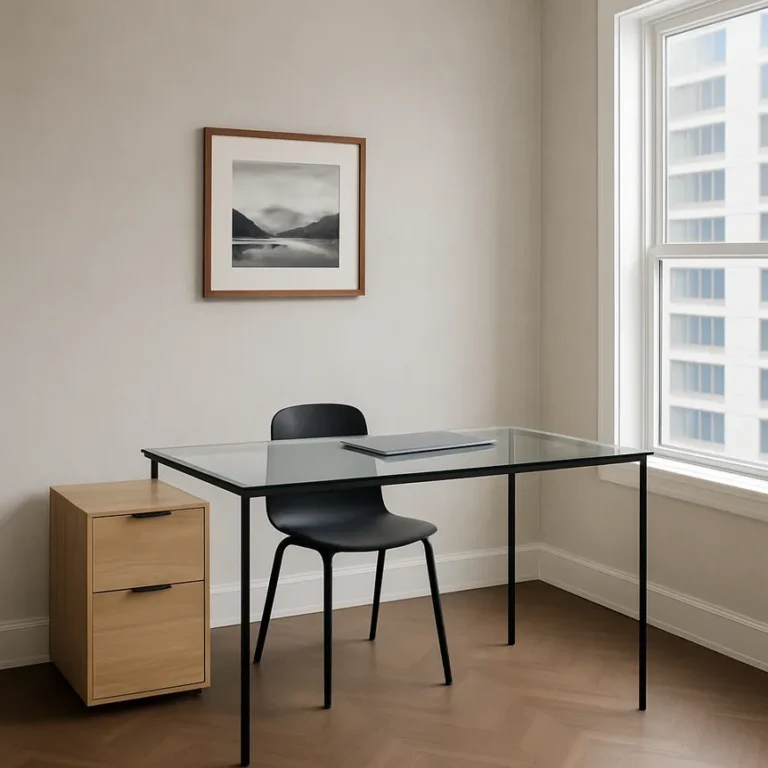
The base determines the visual weight of the room. Tapered legs, hairpin legs, a slim trestle, or a clean rectangular steel frame all keep the floor visible underneath, which makes the room feel larger and lighter. A pedestal base, drawers all the way to the floor, or a heavy panel base reads grounded but eats visual space.
For rooms under 120 square feet, choose the lighter base every time. For larger rooms, a heavier base can work if it suits the style direction.
Desk Materials Compared at a Glance
The shorthand for choosing a desk material is below. Look first at the lifespan and the repairability columns; those two predict whether the desk feels like a five year purchase or a fifteen year one.
| Material | Look | Lifespan | Repairable | Price range | Best for |
|---|---|---|---|---|---|
| Solid wood | Warm, ages with patina | 15+ years | Yes, sand and re oil | 800 to 2,500 | Long term homes |
| Quality veneer over MDF | Indistinguishable from solid wood at first | 5 to 8 years before edges fail | No | 500 to 1,200 | Rentals, lighter use |
| Laminate | Plastic looking up close | 2 to 4 years before peeling | No | 150 to 500 | Strictly temporary |
| Butcher block on steel base | Industrial modern, very honest | 10+ years if oiled annually | Yes | 300 to 700 | Budget conscious builds |
| Stone or linoleum top | Cool, contemporary, mark resistant | 15+ years | Partial | 900 to 2,800 | High wear, minimalist rooms |
Should You Get a Standing Desk or Fixed Height?
A height adjustable standing desk is the right answer for most people who work full time at a screen. The benefit is not the standing itself but the option to change posture across the day. The downside is aesthetic: most adjustable bases are visually busy and read as office furniture rather than as residential furniture.
If you go height adjustable, three things make the difference between a desk that fits a home and one that looks corporate:
- Choose a base with thin profile motors. Bulky tubes read industrial in the wrong way.
- Use a solid wood top, not a laminate one. The motor base is already mechanical. The top should not be.
- Choose a base color that disappears. Matte black or warm walnut to match the top. Avoid chrome and avoid white.
If you go fixed height, pair it with a chair that lets you shift posture comfortably across the day. A real ergonomic task chair with adjustable arms and a good lumbar mechanism does most of the work that a standing desk does for posture, without the visual compromise.
Why the Chair Is Where You Spend the Money
If your furniture budget is split between desk and chair, put more of it into the chair. The chair is the piece you touch for six to nine hours a day. The desk is the piece you look at. Both matter, but a beautiful desk in front of a bad chair becomes a daily compromise with your spine.
The non negotiable features
- Height adjustment. Obvious, but the threshold is having multiple inches of range, not a single setting.
- Real lumbar support. Either adjustable height lumbar or a contoured backrest that hits the natural curve of your lower spine.
- Adjustable arms. Up and down, forward and back, and ideally pivot. Fixed arms force a single elbow position you cannot change.
- Breathable upholstery. Either mesh, woven fabric, or perforated leather. Fully sealed vinyl or non breathable fabric becomes uncomfortable by afternoon.
- Synchronized recline. The seat and back move together when you lean. Without it, the chair fights you when you shift posture.
The chairs worth knowing
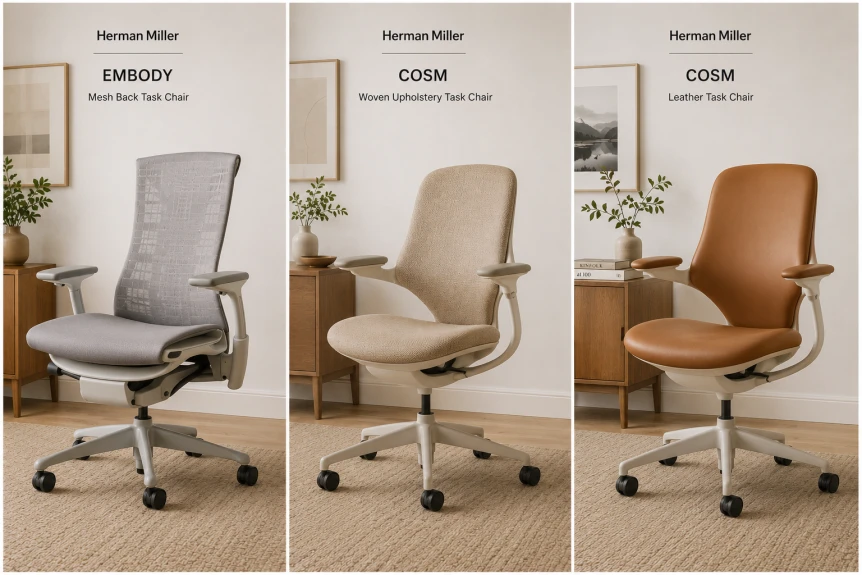
At the high end, Herman Miller’s Aeron, Embody, and Cosm. Steelcase’s Leap and Gesture. Humanscale’s Freedom. All are genuinely good ergonomic chairs and all have been refined over decades. The Cosm in particular has been redesigned in softer colorways that read more residential than corporate.
At the mid range, Steelcase’s Series 1, the Herman Miller Sayl, and any of the Humanscale entry models give you real ergonomics at half the price of the top tier. The build quality is slightly less robust but the function is genuinely good.
Used chairs from these brands are almost always a better value than new chairs from cheaper brands. A used Aeron at 600 dollars outperforms a new 600 dollar chair from anywhere. Look for a chair with no visible mesh sag, working arm adjustments, and a smooth recline mechanism.
How Should You Plan the Storage Layer?
Storage in a home office breaks into two categories: closed and open. The right ratio depends on the room size, the style direction, and how much paper and cable you actually have.
Closed storage: hide what you use daily
Cables, chargers, the printer, files, office supplies, and snacks all belong in closed storage. The single piece that does the most work is a low credenza. It gives you closed storage below, a surface to style with a lamp and a few objects, and a horizontal proportion that grounds the room.
Look for solid wood construction or high quality veneered MDF. Cabinet pulls should match the style direction: brass for mid century, matte black for industrial, no pulls or thin recessed pulls for minimalist and Japandi. The sideboard buying guide applies almost directly to credenza selection.
Open storage: show what you love
Open shelves earn their place when they hold things you love and rarely touch. Books, ceramics, framed photographs, a few objects from travel or family. The rule is to style with negative space. Two to four objects per shelf with breathing room between them reads as deliberate. A shelf packed to capacity reads as storage rather than design.
If you only have wall space for one storage piece, choose closed over open. A low credenza solves more problems than a tall open bookcase. If you have space for both, the credenza is still the priority piece, with floating shelves above it or open shelving elsewhere in the room as the secondary layer.
What About Cable Management?
The single most overlooked piece of home office furniture is the cable system. Without it, the most beautiful desk in the world has a tangle of black and white cords visible from every angle.
The setup that works: a cable tray mounted under the desktop to catch the bulk of the cords, a grommet hole drilled through the top for vertical runs (or a thin desk with a cutout already built in), a power strip fastened to the underside of the desk so the only wire reaching the floor is the one to the wall, and reusable velcro ties on any cable bundle that has to remain visible.
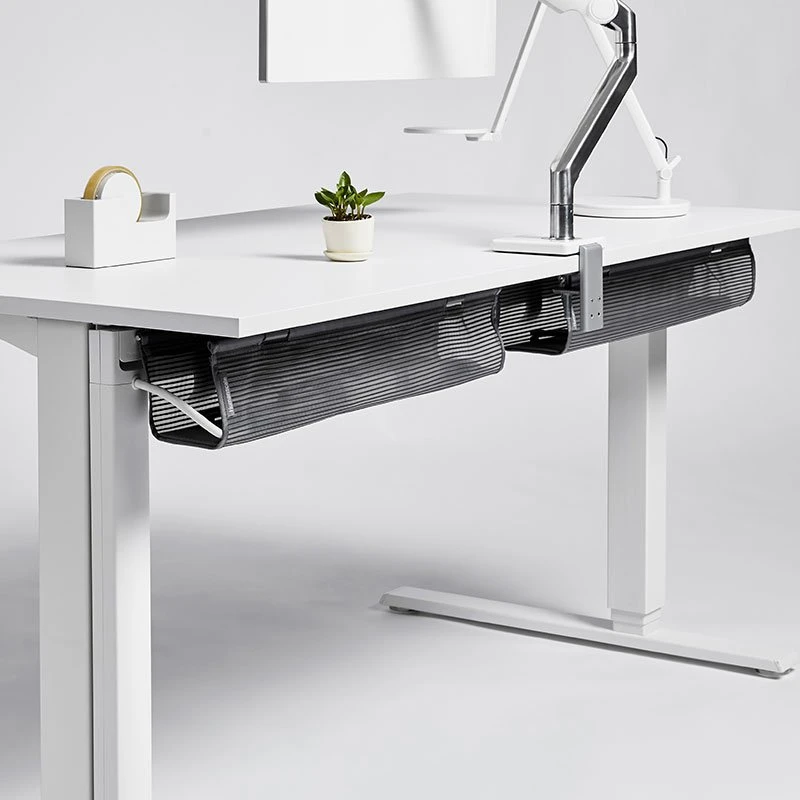
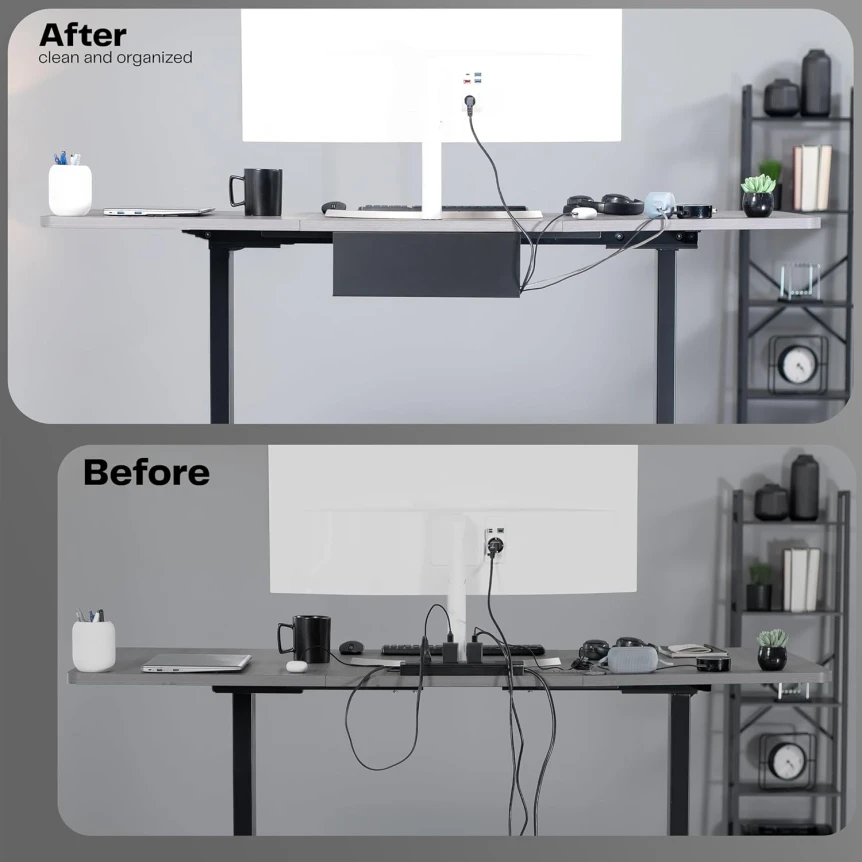
If the desk is freestanding in the middle of the room, the cable problem doubles. The fix is a desk with a finished back panel or a cable raceway that runs from the desk to the nearest wall outlet. Skip this step and the desk reads as a workstation no matter how nice the top is.
Secondary Pieces: Where to Stop
Beyond the desk, chair, and storage, the secondary pieces that genuinely earn their place are limited. A side table or a small bench for a reading break, a single floor lamp for the third lighting layer, a rug to define the zone and absorb sound, and the curtains.
The pieces that almost never earn their place: a second desk for the printer (use a closed cabinet instead), a filing cabinet (cloud storage and one closed drawer are usually enough), a console table behind the desk (eats space without proportional benefit), and a treadmill or under desk exercise bike (the maintenance and visual cost rarely matches the use).
What Are the Most Common Furniture Mistakes?
- Buying the desk before the chair. The chair sets the price floor. Buy it first.
- Going laminate to save money. The two year cost of replacing a laminate desk exceeds the price of a real one. Buy once.
- Choosing a chair on aesthetics alone. A beautiful chair you replace in eighteen months costs more than a less beautiful chair that lasts a decade.
- Skipping cable management. The single largest difference between a designed office and a workstation.
- Buying a filing cabinet by default. Most people no longer need one. A small drawer in a credenza is usually sufficient.
- Matching the desk and chair to each other instead of the room. A set sold together rarely reads as residential. Buy the chair on function and the desk on style, and let them coexist rather than match.
Putting the Furniture Plan Together
Work through the room in this order: chair first, desk second, credenza third, lighting fourth, rug fifth, and everything else after. The chair sets the price floor and the daily comfort. The desk sets the visual weight and the style direction. The credenza solves storage and gives you a styling surface. The lighting and the rug make the room read as designed rather than utilitarian. For the same approach in another style, see color coded bookshelf.
For broader context, the complete guide to modern home office design covers layout, color, acoustics, and the full picture. The modern home office lighting guide covers the lighting layer in more depth.
FAQ
Frequently Asked Questions
How much should I spend on a home office chair?
For a chair you will sit in full time, 800 to 1,500 dollars is the range where real ergonomic chairs from reputable brands live. Used chairs from those brands often deliver the same function for 400 to 700 dollars and are almost always a better value than new chairs from cheaper brands. Below 300 dollars, the chairs are functional but the build quality and adjustability fall off quickly. Above 1,500 dollars, you are paying for materials and finish more than function.
What desk size works in most home offices?
For a single monitor setup, 55 by 28 inches is the workable minimum and 60 by 30 inches is the comfortable standard. For a dual monitor or writing intensive setup, 66 by 30 inches gives you room to work. For small rooms under 100 square feet, 48 by 26 inches can work if you choose a desk with thin legs to keep the room feeling open.
Is a height adjustable desk worth the cost?
For full time screen work, yes. The benefit is not the standing itself but the option to change posture across the day, which prevents the locked in fatigue of holding one position for nine hours. The cost is mostly aesthetic. If you choose a base with thin motors and a solid wood top, the desk reads as residential rather than corporate. If you cannot accept the visual compromise, a fixed desk paired with a real ergonomic chair delivers most of the same benefit.
Do I really need closed storage in a home office?
Yes. Cables, chargers, paper, the printer, and supplies all need to disappear or the room reads as a workstation rather than a designed space. One piece of closed storage, ideally a low credenza, solves the problem and gives you a styling surface as a bonus. Open shelving alone cannot do this work because the visible content becomes visual noise within weeks.
What is the single most important furniture choice?
The chair. It is the piece you touch for six to nine hours a day, and the wrong one creates physical problems that compound over years. Spend more on the chair than the desk if you have to choose. A modest desk with a great chair is a far better setup than a beautiful desk with a chair that hurts your back.
Where to Read Next
For style specific applications of these furniture principles, see Japandi home office ideas, Scandinavian home office ideas for small spaces, mid century modern home office, or industrial home office ideas. For broader furniture context, the minimalist furniture guide and the best modern bedroom furniture guide apply many of the same principles to other rooms.